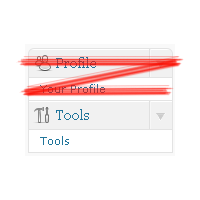
Remove Admin Menu Item
I will show you how to make it in this post. We just add a little piece of code to your theme
functions.php file. Let’s go.
Open your blog current theme functions.php file. And put into begin of it following code:
1 2 3 4 5 6 7 8 9 10 11 12 13 14 15 16 17 18 19 20 21 22 23 24 25 26 27 28 29 | // block profile menu for users with role subscriber if ( is_user_logged_in() ) { if (current_user_can('subscriber')) { function remove_profile_submenu() { global $submenu; //remove Your profile submenu item unset($submenu['profile.php'][5]); } add_action('admin_head', 'remove_profile_submenu'); function remove_profile_menu() { global $menu; // remove Profile top level menu unset($menu[70]); } add_action('admin_head', 'remove_profile_menu'); function profile_redirect() { $result = stripos($_SERVER['REQUEST_URI'], 'profile.php'); if ($result!==false) { wp_redirect(get_option('siteurl') . '/wp-admin/index.php'); } } add_action('admin_menu', 'profile_redirect'); } } // end of block profile menu for users with role |
That’s it. This code snippet blocks user profile editor for all users with subscriber role. I use subscriber role just for example. It can be any another role including your own custom made one. To create your own user role and fill it with capabilities as you and only you wish, use User Role Editor plugin.
Let’s look inside the code.
1st, at line 3 we check what role current logged-in user has:
3 | if (current_user_can('subscriber')) { |
To check another role than subscriber one, change role name to that you wish inside the single quotes at line 3.
Then lines 4-8 removes ‘Your profile’ submenu item. Pay attention on line 7:
7 | unset($submenu['profile.php'][5]); |
How to discover what element of $submenu array to unset? Open wp-admin/menu.php file. Search menu title you wish to block. Search around for $submenu array element declaration. I miss Fortune love you :), you will find needed data. If you can not find it ask your question here, I will try to help.
Lines 11-15 removes ‘Profile’ top level menu. Look at the line 14:
14 | unset($menu[70]); |
In case you wish to block top level menu item you should unset correspondent element of $menu array. Use the same wp-admin/menu.php file for your reference at the 1st step.
Is it enough and can we finish here? No. We just hide menu items from user. But he/she still can call wp-admin/profile.php directly from the browser. At lines 22-29 we redirect user to admin back-end dashboard if he/she tries to call profile.php script.
To block another menu item than “Profile” look into wp-admin/menu.php file from WordPress core and select one you like more :).
“WordPress admin menu permissions” post describes WordPress administrator menu structure including user capability, $menu/$submenu arrays indexes and names of calling PHP scripts for every menu item. Use it for your reference if you are not comfortable with PHP source code reading.
The code I wrote above is tested against WordPress 2.9.2.
Thanks to Clay for general idea and useful post Remove WordPress Admin Menu Without Affecting WordPress Core System which was written directly on discussed subject.


