
Plugins Garbage Collector WordPress plugin

Plugins Garbage Collector

Plugins Garbage Collector

Plugins Garbage Collector

Plugins Garbage Collector

This plugin scans your WordPress database and shows the tables which not belong to the core WordPress installation.
Some WordPress plugins create and use its own database tables. Those tables (small and large) are left in your database after plugin deactivation and deletion often. If your blog is more than 1 day old you have some plugins garbage in your WordPress database probably. With the help of this plugin you can check your database and discover if it is clean or not. Plugin shows not WordPress tables list with quant of its records, size they occupy in Kb. Plugin name and plugin state are shown too if those data are available.
Changes made to the core WordPress database tables (columns added) could be discovered too.

Version 0.9.7 is available. Click the Download button below if you wish to try it.

Attention! Starting from version 0.9.2 plugin works with WordPress 3.0 and higher only. For earlier WordPress versions use plugin version 0.9.1 from here.

Quick Links

FAQ
download

Look at “Plugins Garbage Collector” plugin in action screenshot:
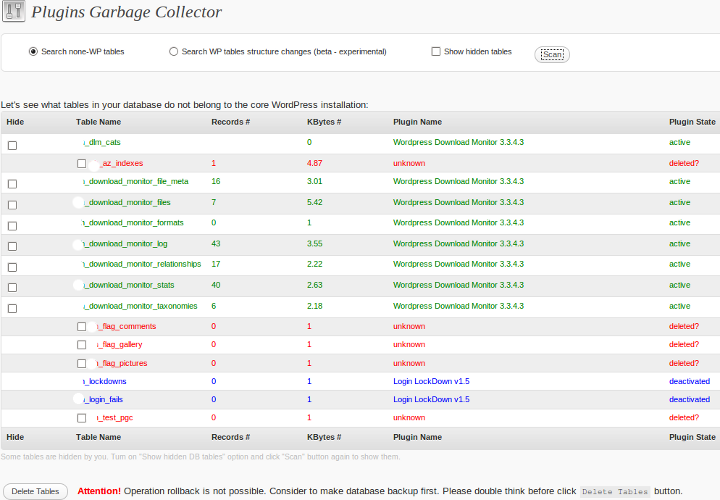
Plugins Garbage Collector in action
  • Red color rows with high probability show old deleted plugins forgotten tables, so-called plugins garbage, which can be deleted from your WordPress database with the help of Delete Tables button or some of your favorite database tools, e.g. phpMyAdmin.
  • Blue color rows show tables which belong to deactivated plugins. Those tables are probably candidates for deletion after you decide to delete theirs parent plugins.
  • Green color rows show tables which belong to active plugins. Those tables are now in use. You do not need to touch them.

How Plugins Garbage Collector works? It selects all table names from your WordPress database, excludes core WordPress installation tables, then scans your plugins directory .php files text for table names and shows you the result as written above.

Delete Tables button appears if you have red color rows in the scan results table only. You need to turn on checkbox near the table name if you decided to drop it before click the Delete Tables button.
Attention! Delete table operation can not be rolled back. Please double think what are you doing before use Delete Tables button.
Plugins Garbage Collector is the decision support tool only and its conclusion about table usage can be wrong in some (I hope rare) cases. For example, if plugin developer uses some sophisticated scheme to assign names for his tables, not puts simple text into source code e.g. ‘my_plugin_table_name’, but calculates it with some algorithm e.g. ‘my’.'_’.'plugin’.'_’.'table’, etc… Final decision is for you – blog owner.

It is highly recommended to make database backup before apply any actions to your WordPress database.

Do you have a suggestion what useful feature we can add to this plugin? Please, left your comments.

Translations

Dear plugin User,
if you wish to help me with this plugin translation I very appreciate it. Please contact me via Contact form and I will answer you by email. Do not forget include your site link in order I can show it with greetings for the translation help at shinephp.com, plugin settings page and in this readme.txt file. If you have better translation for some phrases send it to me. You are welcome!

Special Thanks to

  • alx359 – for contribution to the source code which fixed AJAX empty response for WordPress multi-site with subdomains and other stuff.

You are welcome! Help me in the bug hunting, share with me new ideas about plugin further development, contribute to the source code and link to your site will appear here.

ChangeLog

  • 0.9.7 = 28.07.2011
    - AJAX empty response for WordPress multi-site with subdomains is fixed – thanks to alx359.
    - AJAX error processing is enhanced slightly.
    - Minor enhancements to plugin page CSS are made.
  • 0.9.5 = 16.01.2011
    - Chinese Simple translation is added.
    - Minor change to pgc-ajax.js error processing is made.
  • 0.9.4 = 28.12.2010
    - Italian translation is updated.
    - Latin translation is added.
  • 0.9.3 = 14.10.2010
    - Bug fix: database table name had been processed in the lowercase format and table could not be deleted if have uppercase letters in its name. It is fixed now. If database table has ‘dbTableWithSomeData’ name, you will see it as ‘dbTableWithSomeData’, not as ‘dbtablewithsomedata’. Thanks to [Deirdre](http://unlimitedwhispers.com) who found this bug.
  • 0.9.2 = 27.09.2010
    - Technical update for WordPress 3.0 full compatibility. Staff deprecated since WordPress v.3.0 is excluded.
    - Italian translation update. Thanks to Alessandro Mariani.
  • 0.9.1 = 07.07.2010
    - options form layout problem is fixed. That was wrong pgc-admin.css file version issue.
  • 0.9 = 01.07.2010
    - You can mark tables which you do not wish to see as scan results as hidden.
    - You can search extra columns in the core WordPress tables, which could be added by plugins.
    - Czech translation is added.
  • 0.6 = 25.05.2010
    - Dutch translation is updated.
  • 0.5.2 = 18.05.2010
    - Italian translation is updated.
  • 0.5.1 = 14.05.2010
    - German translation is updated.
  • 0.5 = 12.05.2010
    - Italian translation is added.
    - Lost translation domain inserted into a few places in the source code. Translators a welcome to update their work :) .
  • 0.4 = 03.05.2010
    - “Delete Tables” button is added
    - General code cleanup
  • 0.3 = 02.05.2010
    - German, Japanese translations are added
    - Another text domain ‘pgc’ missing bug is fixed
  • 0.2 = 01.05.2010
    - French, Indonesian, Spanish translations are added
    - Text domain ‘pgc’ missing bug is fixed
  • 0.1 = 29.04.2010
    - 1st pre-release of the “Plugins Garbage Collector” WordPress Plugin.

FAQ

Coming soon. Just ask it. I will search the answer.

download

I am ready to answer on your questions about this plugin usage and help with possible problems. Use Plugins Garbage Collector plugin forum or this page comments and site contact form for that please.

Thanks,
Vladimir, ShinePHP.com.

If looking for quick success then make best use of testking 640-822 notes, testking 642-813 dumps and testking 642-832 practice exam to hit your goal on first try.

Tags: WordPress, wordpress plugin

  • Pingback: Top 10 WordPress Plugins to Spring Clean Your Blog

  • Pingback: Free and Premium WordPress Plugins - Top WP Plugins |

  • Pingback: How to Build Your Own Small Business Website in a Weekend | Small Business Marketing, Trunch, North Walsham, Norfolk.

  • Pingback: Web Marketing - Top Free and Premium WordPress Plugins

  • Pingback: SEO – Optimierung für WordPress Blogs | SEO Optimizer Blog

  • http://shinephp.com Vladimir Garagulya

    Hi,
    Yes, you defined the problem correctly. Edit path to ‘wp-config.php’ in the ‘pgc-ajax.php’ to fix it. You can input full absolute path, or try this ‘../../../../wp-config.php’ there.

  • Yuri

    hi Vladimir
    i just installed the plugin and hit the “delete tables” button for the statpress plugin table.  Is this action exactly the same as if i went into myphpadmin, selected “wp_statpress” and then clicked on “drop”?  Or is it a different action in some/any way?

    Also, with your plugin it seems i can only delete the tables of deleted plugins.  Can i delete the table of an active or disabled plugin?   Or is there a reason i should not do that?

    I have the mbp-ping-optimizer plugin (disabled) which has a large table size (nearly 1 gig).  How can i get rid of this table?  Do i have to delete the plugin and then delete the table, and then re-install the plugin if i want to use it again?

    Or would you recommend “dropping” the table in myphpadmin and then enable the plugin again if i want to use it again?

    thanks for your help
    Yuri

  • http://shinephp.com Vladimir Garagulya

    Hi Yuri,

    >>Is this action exactly the same as if i went into myphpadmin, selected “wp_statpress” and then clicked on “drop”?
    Yes, this action is exactly the same. I execute ‘drop table “table_name”‘ command for selected table in this case.

    >> Can i delete the table of an active or disabled plugin?
    Deleting table of an active plugin will most probably lead to the PHP error and blog misfunction.
    I don’t allow to delete tables of disabled plugin as sometime it could be deactivated temporaly (for buggish plugin isolation fro example). In this case user can delete table just by mistake.
    So yes, you should deleted plugin first in order to get ability to delete its tables with help of PGC plugin.
    Some good made plugins deletes their tables themselves when you press ‘delete’ link in WordPress plugins panel.

    You may use as PGC as MyPhpAdmin, what’s more convenient for your purposes.

  • Yuri

    Hi Vladimir
    thank you for your response!  I have another question, not exactly related to your plugin but related to MyPhpAdmin, if you would be kind enough to help.

    I have some wp sites that i’ve “let go”. Domain is expired, i’ve deleted the website file in cpanel file manager, and i’ve removed the addon domain.  But when i was MyPhpAdmin,  i noticed the tables are still there for that site.

    Is there any reason i should leave the tables there?

    Or should i delete them?  If so,  after i “check all” do i then apply the “drop” or the “empty” action?  I don’t know what the difference is between “drop” and “empty”

    If “dropping” the table means to delete it,  and “emptying” the table means to keep it but empty it’s contents….  is it safe to “empty” the table on a plugin which is still active?

    thank you
    Yuri

  • http://shinephp.com Vladimir Garagulya

    If you don’t plan to restore data from the deleted domain sometime somewhere there is no reason to keep those tables in the database. Just drop them. 
    Drop command deletes the table itself – “delete table ‘table_name’” SQL command is executed.
    Empty command deletes all records/data/content from the table – “delete from ‘table_name’” SQL command is executed.
    It’s not safe to delete data from DB table which belongs to active plugin in the most of cases. Plugin could store some critical data there without which it could not work for example.
    So it’s more safe to deactivate plugin and delete its tables, then activate plugin, in order it will be fully re-installed from the scratch. 
    If you are sure that some DB table was empty after the plugin activation you can empty it without plugin work break, of course.

  • kent T

    hi, good day!

    I installed your plugin but it seems it doesn’t work. 

    It just stays on Plugins Garbage Collector page with the circling loading icon, but it doesn’t seem to work. I left it for 5 hours and when i get back it is still circling circling circling.

    Any advice? By the way i’m on wordpress 3.3

  • Anonymous

    @Kent T I also have WP 3.3 running and Garbage Collector is working fine on at least two different websites.

  • http://shinephp.com Vladimir Garagulya

    Thanks for sharing this information.

  • http://shinephp.com Vladimir Garagulya

    Hi Kent!

    As one of the reasons: if you have a lot of plugins installed, script could be interrupted by PHP execution time limit of your server. So, please answer how much plugins you have of your blog, including deactivated plugins?Is it possible to activate temporally DEBUG option in wp-config.php and execute PGC check again? May be you get some error message then, which could help to identify problem.