Silence is golden

Silence is golden

Silence is golden


Is your new WordPress plugin secure? Did you see the small 30 byte size only index.php file in such WordPress folders as wp-content, wp-content/themes? It is placed there by WordPress developers for the security reason. The explanation is obvious: if somebody input in his browser the URL like
http://www.yourblog.com/wp-content/plugins/
he could not see the full folder content, its subfolders and files list. Of course there are some other methods to hide directory list from visitors, for example it can be done with .htaccess directive but this (empty index.php file) way is the most simple and straightforward one.
Some of WordPress plugins developers ignore this issue and don’t put such empty index.php file into theirs plugins folders and subfolders.
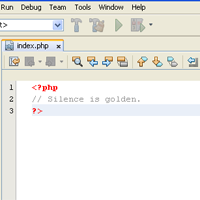
It is highly recommended that you check this file presence at the new installed plugin folder and its subfolders after every new WordPress plugin installation. Put this index.php file

<?php
// Silence is golden.
?>

there yourself if plugin’s author missed it.
I made a plugin to make this job automatically. You can read about it at Silence is Golden Guard WordPress Plugin. Download link is available there also.

Tags: plugins, Security, WordPress

  • http://www.shinephp.com/2009/09/06/wordpress-security-silence-is-golden-part-2/ WordPress Security: Silence is golden. Part 2. | ShinePHP.com

    [...] It is better to put your PHP error log file somewhere beyound of your site root in order it will not be accessible to your site visitors. For more information about php.ini directives you can visit this php.net link. And remember – “Silence is golden”. [...]

  • MClark

    We are finding some of our sites that are not Word Press have a similar script and it shuts down the site – we did not put it there and have to remove it to restore the site functionality as it overides the index.html on php servers – see this link http://www.webdeveloper.com/forum/showthread.ph...

    Did someone try to write a script to protect multiple directories and it went awry?

  • http://wpair.com/silence-is-golden-shinephpcom/ Silence is golden | ShinePHP.com · WP Air

    [...] Read the rest here:  Silence is golden | ShinePHP.com [...]

  • shinephp

    If you have HTML only site, You can prevent the execution of scripts inside the root directory and all its sub-directories using .htaccess functionality. You can forbid PHP script execution at all. Please look at the
    http://codex.wordpress.org/htaccess_for_subdire...
    article and use settings which more convenient for you.
    If your host doesn't allow to use .htaccess you can place index.php with redirection to the index.html into your site root directory and empty index.php into all its sub-directories, and set up read only permisions to that files – something like 444. As a result maliciouse FTP visitor could not rewrite those files and make a damage to your site using it.

  • shinephp

    If you have HTML only site, You can prevent the execution of scripts inside the root directory and all its sub-directories using .htaccess functionality. You can forbid PHP script execution at all. Please look at the
    http://codex.wordpress.org/htaccess_for_subdire...
    article and use settings which more convenient for you.
    If your host doesn't allow to use .htaccess you can place index.php with redirection to the index.html into your site root directory and empty index.php into all its sub-directories, and set up read only permisions to that files – something like 444. As a result maliciouse FTP visitor could not rewrite those files and make a damage to your site using it.

  • http://www.shinephp.com/silence-is-golden-guard-wordpress-plugin/ Silence is Golden WordPress Plugin | ShinePHP.com

    [...] don’t know for what reason those files included into WordPress package please read this post “Silence is Golden”. This plugin can scan your WordPress blog installation directory including subdirectories for the [...]

  • http://arindamchakraborty.com/huge-list-of-cool-wordpress-plugins-part-1 Huge List of Cool WordPress Plugins-Part 1

    [...] "preventive security". When it comes to WordPress security, I basically try to follow the silence is golden [...]

  • http://www.tobajoseph.com/blog/uncategorized/huge-list-of-cool-wordpress-plugins-part-1 Huge List of Cool WordPress Plugins-Part 1 | Toba Joseph

    [...] is known aspreventive security. When it comes to WordPress security, I basically try to follow the silence is golden [...]

blog comments powered by Disqus