User Role Editor WordPress plugin

User Role Editor WordPress plugin

User Role Editor

User Role Editor WordPress plugin allows you to change standard WordPress user roles capabilities with easiness of a few mouse clicks. Just turn on check boxes of capabilities you wish to add to the selected role and click “Update” button to save your changes. That’s done. Add and tune your own custom roles which you can assign to the users then. You can create new role as a copy of existing one. Delete self-made roles. Change defaul user role.
Multi-site support is provided.
Why it could be necessary? Let’s suppose you wish that your multi-authored blog contributors upload their own graphics to use in their posts. WordPress “contributor” role has no such capability by default. In such situation you have needed to change user role capabilities manually using SQL client as I described at “How to change wordpress user role capabilities” post, if you have enough knowledge in that field. But what to do if you have not? Good news – This task is simple now, just use the “User Role Editor” plugin :) .

Version 3.6.1 is available. Click the Download button below if you wish to try it.
download

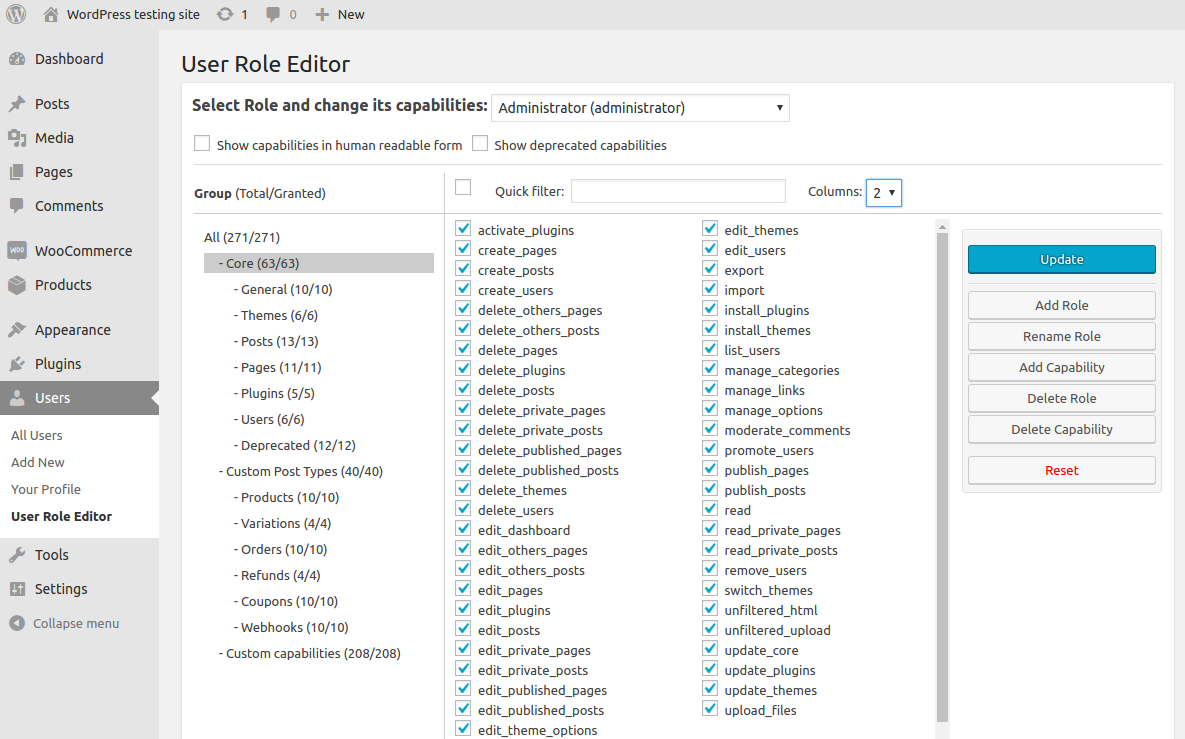
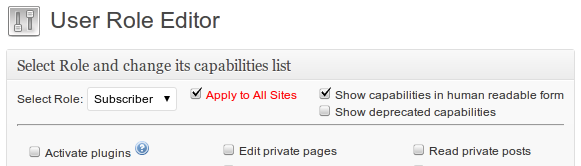
Take a look at the “User Role Editor” plugin main form screenshot:
User Role Editor main form

  • Select a role you wish to change from the drop down list at the top. Page will be refreshed automatically and show you the capabilities list for the selected role. Make your corrections, check/uncheck correspondent check boxes and click “Update” button to save your changes. If you wish to apply this change for all sites of your multi-site WordPress network, turn on “Apply to All Sites” check box at the top of the form before press “Update”.
  • If you prefer to see capabilities names in form e.g. ‘Edit pages’ instead of WordPress ‘edit_pages’ standard form turn on the “Show capabilities in human readable form” checkbox at the right top corner of the main form. Move mouse over capability name and you will see its alternative form name.
  • According to WordPress Codex User Levels were introduced in WordPress 1.5, they were replaced by Roles and Capabilities in WordPress 2.0, and were finaly deprecated in WordPress 3.0. Thus you can hide them in order they do not mess you in your work with roles. Keep “Show deprecated capabilities” check box at the to right corner of the form unchecked for that. If for any reason you need to see user levels, turn on that check box.
  • If you don’t wish to save changes you can click “Cancel” button.
  • If you are needed to restore roles capabilities you have before 1st visit “User Role Editor” main form, use “Reset” button.
    When you you open this form 1st time, plugin checks if backup copy of roles and capabilities exists. If it doesn’t, plugin creates backup copy automatically. Thus, when you some day click the Reset button plugin uses the previously saved role data backup copy to restore it. Be very careful with this operation as you will definitely lose any changes you or your plugins made to user roles from that time.

In order to add/remove your custom role, change default role for new user, add/remove custom user capability use “User Role Editor” management boxes, look on screenshot below:
User Role Editor custom roles and capabilities management boxes

  • If you need your own custom role, create it with “Add New Role” feature. Input new role name into input text field at “Add New Role” box, select existing role from drop-down list if you wish to use its capabilities as starting point for further work and click “Add” button. Remember that you can use latin letters, digits and an “_” underscore sign in your role names. Subscriber role is copied by default if you don’t select such role yourself.
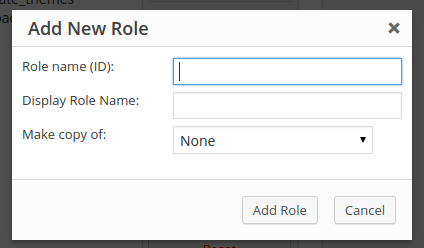
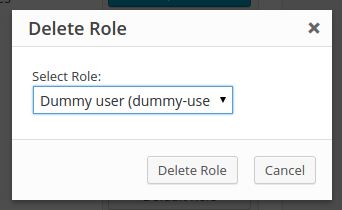
  • Unnecessary self-made role can be deleted with “Delete Role” box. Select role and click “Delete” button for it. Only your self-made roles appears in the role list to delete. If some of your own roles is assigne to the user or selected as default role for new users it will not be appeared in the list for deletion.
  • Select the role which you wish to use as default for any new created user from the list at “Default Role for New User” box. Click “Change” button to save your changes.
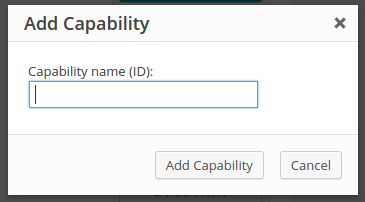
  • Use “Add New Capability” box in order to add new user capability. Remember you can use only latin alphabet letters, digits and underscore sign in the capability name. How to use new added user capability? Turn it on in the role you select and check if current user has such capability in your plugin or active theme functions.php file. For example,
     if (!current_user_can('some_capability_you_added')) {
       echo "You don't have permission for it!";
       return;
    }
  • If you need delete custom capability added by you or some of your old plugins, which you don’t use anymore use “Delete Capability” box. “User Role Editor” doesn’t allow to delete built-in WordPress capabilities.

With help of “User Role Editor” you can assign additional capabilities directly to the users. Open users list by click on the “All Users” link at the “Users” submenu. Find needed user, move mouse pointer to his name and click “Capabilities” link as on screenshot below:
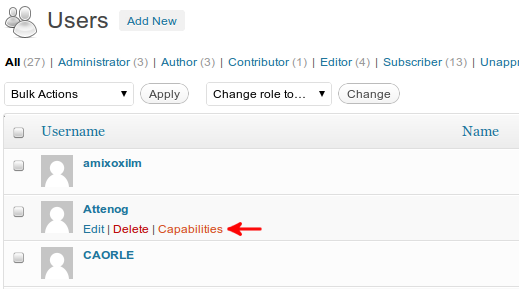
User Capabilities Editor link
At the form opened you can assign to user another role and/or add to him capabilities which not included to his role:
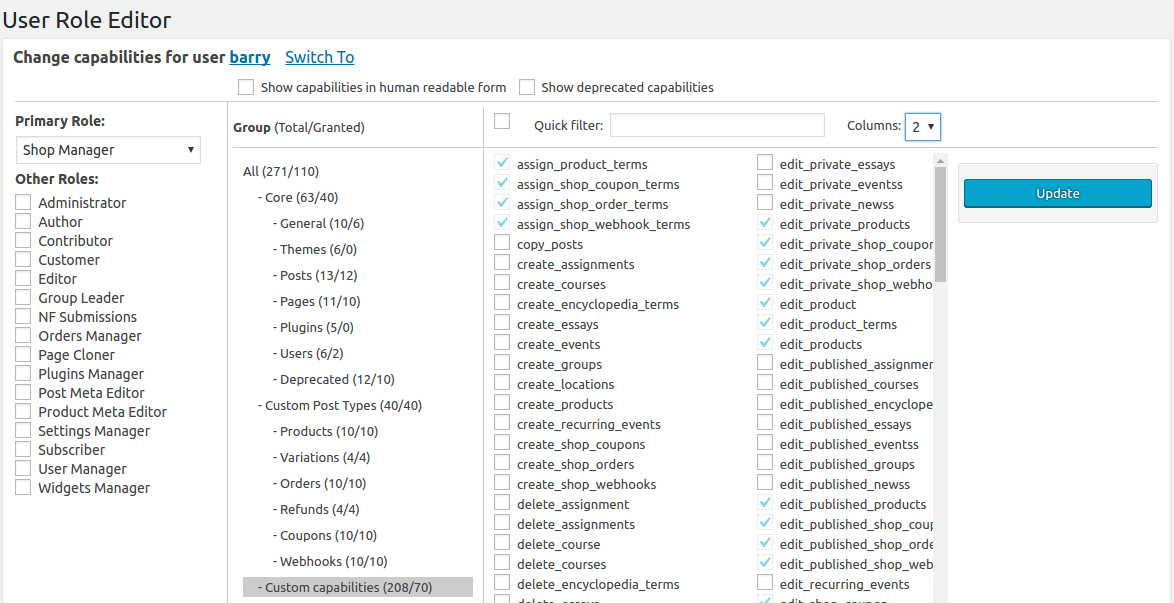
Change User Capabilities
You can not turn off capabilities included to the role assigned to this user. You can add/remove other capabilities. They will be applied directly to the user as you click the “Update” button. If you wish to built a fully custom capabilities set for this user, without limitation of any role, select “No role for this site” from drop-down list at the top and make it.

For more information about WordPress user roles please read these articles
- WordPress Admin Menu Permissions;
- WordPress user capabilities;
- activate_plugins WordPress user capability;
- edit_dashboard WordPress user capability;
- Delete posts and pages WordPress user capabilities set;
- delete_plugins WordPress user capability;
- moderate_comments WordPress user capability;
- Roles and Capabilities article at codex.wordpress.org;

Translations

Русская версия этой статьи доступна по адресу ru.shinephp.com

All other translations listed below are outdated and need to be updated. It’s very simple to get link to your site from this page – just update your native language translation file and send it to me. You are welcome!

Dear plugin User,
if you wish to help me with this plugin translation I very appreciate it. Please contact me via Contact form and I will answer you by email. Do not forget include your site link in order I can show it with greetings for the translation help at shinephp.com, plugin settings page and in this readme.txt file. If you have better translation for some phrases send it to me. You are welcome!
Former translators! Please check your translations and provide the updated files corresponding to the current version of URE plugin.

Special Thanks to

  • Lorenzo Nicoletti – for the code enhancement suggestion CUSTOM_USER_META_TABLE constant is used now for more compatibility with core WordPress API.
  • Marcin – For the code enhancement. This contribution allows to not lose new custom capability if it is added to other than ‘Administrator’ role.
  • FullThrottle – for the code to hide administrator role at admin backend.

You are welcome! Help me with bugs catching, share with me new ideas about plugin further development and link to your site will appear above.

People who donated for this plugin developement

Change Log

  • 3.6.1 = 07.05.2012
    - Italian translation is updated. Thanks to Tristano Ajmone.
  • 3.6 = 30.04.2012
    - CSS and page layout fix for compatibility with WordPress 3.4.
    - WordPress multi-site: when new blog created default role setting is copied for it from the main blog default role value now.
    - Minor translations files updates, e.g synchronizing them with plugin source code, Russian roles names in plugin are identical to those WordPress uses itself now, etc.
  • 3.5.4 = 04.04.2012
    - Lithuanian translation is added, thanks to Vincent G.
    - Spanish translation is updated, thanks to Victor Ricardo Díaz.
  • 3.5.3 = 24.03.2012
    - French translation is updated, thanks to Presse et Multimedia.
    - Hebrew translation is updated, thanks to Aryo Digital.
    - Persian translation is updated, thanks to Parsa.
    - Minor CSS fix to provide compatibility with RTL languages.
  • 3.5.2 = 17.03.2012
    - Turkish translation is updated, thanks to Muhammed YILDIRIM.
    - Dutch translation is updated, thanks to Frank Groeneveld.
  • 3.5.1 = 24.02.2012
    - Bugs for multi-site WordPress network installation were discovered and fixed:
    1) blocked login to admin back-end;
    2) empty users list for administrators of single sites;
    3) empty authors drop down list at the post editor page.
    - If URE plugin is not enabled for single site administrator, then URE is automatically excluded from plugins list available to that administrator.
  • 3.5 = 19.02.2012
    - User Role Editor could be available now for single site administrators (Administrator role) under multi-site environment. You should define URE_ENABLE_SIMPLE_ADMIN_FOR_MULTISITE constant in your blog wp-config.php file for that. Insert this line

     define('URE_ENABLE_SIMPLE_ADMIN_FOR_MULTISITE', 1);

    there, if you decide to give single site admin such opportunity.
    - One of “User Role Editor” users with 1100+ sites in the multi-site network reported that URE doesn’t update roles for all sites, but stalls somewhere in the middle. Other network update method is realized as alternative. Due to my tests it works approximately 30 times faster. If you met the same problem, try it. It will be great if you share your experience with me. In order select alternative method of all sites update add this line to you blog wp-config.php file

     define('URE_MULTISITE_DIRECT_UPDATE', 1);

    But be careful. It’s recommended to make 1st try on the backup copy, not on a live site.
    - Persian translation is updated. Thanks to Parsa.

  • 3.4 = 21.01.2012
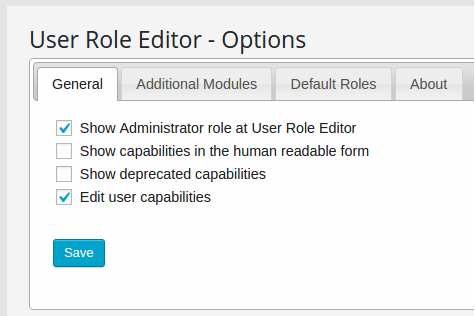
    - You can see/edit “Administrator” role now. Insert this line of code

      define('URE_SHOW_ADMIN_ROLE', 1);

    into your wp-config.php file and login with administrator account for that.
    If for any reason your Administrator role missed some capabilities added by plugins or themes, you can fix that now. But be careful with changing “Administrator” role, do not turn off accidentally some critical capabilities to not block your admin users.

Click here to get full list of User Role Editor updates.

FAQ

- Does it work in multi-site environment?
Yes, it works with multi-site installation. By default plugin works for every blog from your multi-site network as for locally installed blog without multi-site feature.
URE Multi-site feature

URE Multi-site feature


To update selected role globally for all Network you should turn on the “Apply to All Sites” checkbox.

- How to duplicate my custom created roles from main blog of my multi-site network to new created one?
“User Role Editor” makes it for you automatically. As new blog added to your network, “User Role Editor” copies full roles staff from your main blog to the new created one.

- Why administrators of single site of multi-site network do not see “User Role Editor” under “Users” menu?
URE is disabled for single site administrator by default. If you wish to enable it for single site adminitstrator add this line of code into your blog wp-config.php file

define('URE_ENABLE_SIMPLE_ADMIN_FOR_MULTISITE', 1);

- I have large multi-site network. After click “Update” button with “Save to all sites” checkbox turned on nothing is happened. I got the blank page.
It is PHP script execution time limit problem. Other network update method is available as alternative from version 3.5. Due to my tests it works approximately 30 times faster. Try it. It will be great, if you share your experience with me. In order to select alternative method of all sites update add this line to you blog wp-config.php file

define('URE_MULTISITE_DIRECT_UPDATE', 1);

It does nothing automatically, just select other algorithm when you press “Update” with “Apply to All Sites” checkbox turned on next time.
If you define WP_DEBUG equal to 1 or true constant in wp-config.php file, URE with this directive shows update execution time in milliseconds as additional technical information.

- How to edit “Administrator” role? I don’t see it in the roles drop down list.
“Administrator” role is hidden from the roles drop down list by default.
You can see/edit “Administrator” role starting from version 3.4. Insert this line of code

  define('URE_SHOW_ADMIN_ROLE', 1);

into your wp-config.php file and login with administrator account for that.
If for any reason your “Administrator” role missed some capabilities added by plugins or themes, you can fix that now. But be careful with changing “Administrator” role, do not turn off accidentally some critical capabilities to not block your admin users.

- Does it work with WordPress versions prior 3.0?
Starting from version 2.2 plugin works with WordPress 3.0 and higher only. For earlier WordPress versions use plugin version 2.1.10

download

I am ready to answer on your questions about this plugin usage and help with possible problems. Use User Role Editor plugin forum or this page comments and site contact form for that please.

Thanks,
Vladimir ShinePHP.com

The testking offers guaranteed testking VCP-410 training with best quality testking 350-001 braindumps and testking 70-680 practice exam.

Tags: WordPress, wordpress plugin

  • http://shinephp.com Vladimir Garagulya

    Hi Nik,

    Good news again! Thanks.
    Agree. I will revise instructions according to your suggestions.

  • Jacamo

    I Installed the plugin and it works great, thanks to all you guys. I do have one niggle that I hope you can help with. I want to create user roles that have spaces in their names. How can I do this.

    Thanks

  • http://shinephp.com Vladimir Garagulya

    Thanks to you for good words and using this plugin.
    You can use ‘word1_word2′ scheme only with “User Role Editor”. Plugin has built-in name validation rool, so as you mentioned spaces are not allowed inside role names. May be it is artificial requirement as WordPress itself has no such limitation. But as a programmer myself, I decided to setup it for role names as it’s done for identifiers in programming languages.

  • http://shinephp.com Vladimir Garagulya

    Thanks, Xavier.

  • laxadmin

    Hello! we are a youth sports org and we want to give access to coaches just to edir thier team page and nothing else can we get that granular for user rights with this plug in.

  • http://shinephp.com Vladimir Garagulya

     Hi!
    No, this plugin could help you manage your blog user roles. But it doesn’t manage access to your blog posts or pages. Some additional coding is needed for that. Or try other plugins, which could restrict access to the content on the roles basis, e.g. “Role Scoper”.

  • Missloo

    Hi Vladimir ! Thank you very much for your excellent and very useful plugin. With its help we’ve created a new custom user role. This new user is able to add/delete new users. It appears that the user role editor menu is shown in the users menu even if this new user doesn’t get the right to access to it.
    How can we make it user role editor disappear from there ?
    Thanks

  • http://shinephp.com Vladimir Garagulya

    Hi!
    Currently URE has not own capability to check if show/hide its menu item. It uses ‘edit_users’ capability for single site configuration and ‘manage_network_users” for multiple sites network configuration. If you configured URE_ENABLE_SIMPLE_ADMIN_FOR_MULTISITE parameter in your blog wp-config.php file, then it uses ‘add_user’ capability.
    You can add your own capability and insert it into URE code: user_role_editor.php file, function ure_settings_menu(), line # 228.

  • http://veken.org Veken

    I am having the same issue.

  • http://shinephp.com Vladimir Garagulya

    I need to repeat problem in order to fix it. Can you please to describe in details what do you do?

  • http://veken.org Veken

    I just installed the plugin, made some changes to the contributor role, saved. it said successful but when going back to view the role, none of the changes had saved.

  • http://shinephp.com Vladimir Garagulya

    What WordPress version is running on your site?
    Is your WordPress configured as multi-site network or just single blog?

  • Os

    Hello
    I want users can post but not modify after they have posted.
    What is the setting for it?

    I tried  ’edit_posts’ on and ‘edit_published_posts’ off.
    By this setting, the user can post but I can’t see it except the title.
    There is no contents in custom fields.

    Please advise.

  • http://shinephp.com Vladimir Garagulya

    Hello, read about my little test:
    I created a new role as copy of the ‘Author’ role, removed ‘delete_published_posts’, ‘edit_published_posts’, added ‘publish_posts’ capability, assigned it to user. This way user can add new post, edit it, while it’s not published, publish it. Since post is published user can not modify it as you wish, so he can see its content just from front-end. It’s valid behavior, WordPress blocked post editor for published posts according to this user role.
    Other users who have ‘edit_published_posts’ capability still see all post attributes including custom fields values.

  • Os

    Thank you for your reply.

    How about with the Custom Post Type?

    I followed the way you showed me, I didn’t work.
    I can’t see its content even from front-end.

  • http://shinephp.com Vladimir Garagulya

    Check if your custom post type has its own custom capability defined. Generally, if custom capability is not defined, then default ‘post’, e.g. ‘edit_posts’, ‘publish_posts’ is used. But in case it is defined something like ‘edit_notes’, ‘publish_notes’, you should check those custom capabilities instead of default.

  • Os

    I use Custom Post Type UI plugin.
    It seems to have no setting to define capabilities.

    Is there anything should I do?

    Thank you for taking your time for me. 

  • http://shinephp.com Vladimir Garagulya

     Show screen-shot of your self-made role. I will try to reproduce your situation at my test site.

  • NONBOX

    I’m getting the error “Only Administrator is allowed to use User Role Editor” when I try and access the settings. I am Super Administrator, and used to be able to access the settings. How can I get in and make changes now?

  • http://shinephp.com Vladimir Garagulya

    ‘Superadministrator’ is a term for multi-site WordPress installation. As you got ‘Only Administrator’ not ‘Only SuperAdministrator’ in error message from URE, I got conclusion that your blog is configured as single site.
    For single site WordPress URE checks if current user has ‘administrator’ role. If he has not, he get the error message you mentioned above.

  • http://www.humortimes.com James Israel

    None of the changes I make to any role are taking anymore. After I hit Update, it says it’s made the changes, but if I go to another role, then come back, all the old settings are still there. What could be going wrong? I am the administrator of the site. http://www.humortimes.com

  • http://www.humortimes.com James Israel

    I did a database repair & optimization, and that seemed to fix previously edited roles. But when I tried to change another role, and came back to it, the plugin did not show any changes again. I had to repair & optimize again for the changes to show in the plugin. This is pretty frustrating.

  • http://shinephp.com Vladimir Garagulya

    Updates are in DB, but you don’t see them in WP back-end via URE page, right?

    Just the guess: Do you use any caching plugin, which could cache your database requests from admin back-end too?

  • http://www.humortimes.com James Israel

    I use WT3 Cache, but I don’t have any problem like that on the backend for any other plugins. Also, I’m pretty sure I had made some of these changes months ago (and had just assumed they had taken, but didn’t check), and when I recently checked, they had not been changed. No cache would hold that info that long, obviously.

    I will test again, to make sure, and flush the cache after I make changes, to see if they then show.

  • http://shinephp.com Vladimir Garagulya

    Make backup copy of your WordPress database in order to be capable restore in case of accident. Then try to press ‘Reset’ button at URE page. It should restore your WP roles into state before you started experiments with URE.

  • Joanna Cook

     One of my clients had deleted the admin account in the roles plugin. Is there a way to restore this?

  • http://shinephp.com Vladimir Garagulya
  • Telmi

    Добрый день.
    У меня на сайте кроме стандартных статей и страниц есть еще и пользовательский тип записей. Как настроить роль так, чтобы она могла редактировать ТОЛЬКО этот тип данных?

  • http://shinephp.com Vladimir Garagulya

    День добрый.
    В настройках пользовательского типа записей должна быть возможность указать специальное разрешение для этого типа вместо ‘edit_posts’ по-умолчанию. Тогда останется включить в новую роль вместо edit_posts, к примеру, edit_your_custom_posts и т.д.

  • Telmi

    Я заказывала плагин и он реализован через пользовательский тип данных, а вы не знаете как и где указать специальное разрешение для этого типа?

  • http://shinephp.com Vladimir Garagulya

    Лучше всего уточнить у автора плагина. Если это по каким-то причинам невозможно, то где-то в исходном коде плагина должна вызываться функция register_post_type()
    Этой функции в качестве параметра передаётся массив аргументов, среди которых есть параметр c именем ‘capability_type’. Если не используется специальное разрешение, то значение параметра скорее всего ‘post’. Если вместо ‘post’ указать ‘video’, то в роль нужно будет добавить разрешения ‘edit_videos’ и т.п., в полной аналогии с ‘edit_posts’, ‘delete_posts’, ‘publish_posts’ и т.д.

  • Telmi

    Вот код

     $args = array (
                      ‘public’ => true,
                      ‘labels’ => array(‘name’ => ‘Вопросы’, ‘singular_name’ => ‘Вопрос’, ‘add_new’ => ‘Добавить вопрос’),
                      ‘show_in_menu’ => true,
                      ‘menu_icon’ => plugins_url(‘wp-wpdm-qa/images/icon.png’),
                      ‘query_var’ => true,
                      ‘rewrite’ => true,
                      ‘capability_type’ => ‘vo’
                      );

       register_post_type(‘question’, $args);

    Вот настройки плагина http://s1.ipicture.ru/uploads/20120507/mU4PeSv3.png

    но при этом недоступно редактирование и даже просмотр этого типа записей, выскакивает “Играешься, что ли?”. Доступно только вот что http://s1.ipicture.ru/uploads/20120507/mlwDXIP2.png

  • http://shinephp.com Vladimir Garagulya

    Такой комментарий я нашел в исходном коде WordPress:
    * The capability_type argument can optionally be registered as an array, with
     * the first value being singular and the second plural, e.g. array(‘story, ‘stories’)
     * Otherwise, an ‘s’ will be added to the value for the plural form.

    function get_post_type_capabilities( $args ) {
      if ( ! is_array( $args->capability_type ) ) $args->capability_type = array( $args->capability_type, $args->capability_type . 's' );
    ...

    Исходя из выше описанного, все разрешения (возможности)  для ваших “вопросов” должны иметь букву ‘s’ на конце. То есть не ‘edit_vo’, ‘edit_others_vo’, а ‘edit_vos’, ‘edit_others_vos’ и т.д. Попробуйте добавить вручную такие разрешения в вашу роль и проверить, получит ли после этого пользователь с такой ролью видеть и редактировать вопросы. Похоже разработчик плагина, не указав множественное число для разрешения ‘vo’,  и не добавив букву ‘s’ в конец автоматически используемого разрешения, допустил ошибку при программном добавлении разрешений для пользовательского типа записей – вопрос.

  • Telmi

    эту строку писал не разработчик, а я сама добавила (‘capability_type’ вообще не было).
    ‘capability_type’ => ‘vo’

    если я ее оставлю в таком виде и пропишу разрешения с ‘s’ на конце, то :

    настройки плагина выглядят так http://s2.ipicture.ru/uploads/20120508/WT4eoyi8.png

    а для пользователя почему-то недоступно редактирование записей этого типа http://s2.ipicture.ru/uploads/20120508/oaRKSojy.png

  • http://shinephp.com Vladimir Garagulya

    Возможно не все изменения в составе роли отразились на данном пользователе. На всякий случай попробуйте поменять ему роль в профиле, сохранить изменения, а потом опять вернуть роль “VoprosOtvet”.
    В роль VoprosOtvet входят и разрешения из стандартной роли “Редактор”. Значит цель разделить эти функции вы не ставите? Зачем тогда вводить специальные разрешения для записей типа “Вопрос”? Почему не использовать стандартную роль и разрешения по-умолчанию? Или это не сработало?

  • Info

    Hi
    I Love this plugin. I have a theme that has a section called Portfolio, Hoe do I use Add New Capacity to give an Editor the acces to publish, edit and delete Portfolios?
    Thanks

  • Telmi

    В роль “VoprosOtvet” входили разрешения из стандартной роли “Редактор”,
    т.к. параллельно ролью “VoprosOtvet” пользовался человек для работы с
    Вопросами-Ответами и без разрешений из роли редактора Вопросы нельзя
    редактировать (как я уже писала выше – не работают ‘edit_vos’,
    ‘edit_others_vos’)

    Эти роли мне НУЖНО разделить, мне нужна роль, которая сможет только редактировать Вопросы-Ответы. Даже без возможности их создавать и удалять можно.

    Теперь я создала тестовую роль для него, а в роли “VoprosOtvet” оставила вот что http://s1.ipicture.ru/uploads/20120515/Q7BYVG55.png

    Но если прописана строка                   ‘capability_type’ => ‘vo’

    то не только роль “VoprosOtvet” , но  даже пользователь – администратор
    не может создавать, редактировать этот тип записей (хотя для него я даже
    не вижу возможность отредактировать роль)

  • http://www.incontrolwebsites.com/ Lynn VanDyke

    Hi, I’m looking to allow Editor roles access to what they normally have in WordPress accessibility.   However I’d like for them to have access to Menus (under Appearance) and Widgets (also under Appearance) and that’s it.  I’ve installed your plugin but don’t see those as options anywhere.  Can you advise on how I should go about doing this?  Thank you so much!

  • http://shinephp.com Vladimir Garagulya

    Hi,
    somewhere in  theme’s code function register_post_type() should be called.
    Among parameters of this function you will find ‘capability_type’. If it is not used or equal ‘post’, then custom post type ‘portfolio’ uses standard ‘post’ capability type. That is ‘edit_posts’, etc. Editor role should be capable to manage this post type already in that case.Check if theme author placed something like ‘portfolio’ there. Then you should add ‘edit_portfolios’, ‘delete_portfolios’, ‘publish_portfolios’, etc. to your Editor role.

    WordPress source code fragment for your reference:
    * The capability_type argument can optionally be registered as an array, with 
    * the first value being singular and the second plural, e.g. array('story, 'stories') 
    * Otherwise, an 's' will be added to the value for the plural form.
    function get_post_type_capabilities( $args ) {
      if ( ! is_array( $args->capability_type ) ) $args->capability_type = array( $args->capability_type, $args->capability_type . 's' );
    ...

  • http://shinephp.com Vladimir Garagulya

    Hi,
    edit_theme_options capability could help you. Read this post 
    http://www.shinephp.com/wordpress-admin-menu-permissions/

  • http://shinephp.com Vladimir Garagulya

    Скорее всего новые разрешения не активированы в роли “Администратор”.
    Если никто кроме вас не имеет доступа к User Role Editor, то можно вернуть роль “Администратор” в список доступных для изменения ролей. Для этого добавьте эту строчку  define(‘URE_SHOW_ADMIN_ROLE’, 1);
    в файл wp-config.php

    Попробуйте включить в роль “ВопросОтвет” все те же разрешения, что и в роли  ”Редактор”, затем уберите те, что включают в себя ‘post’. Посмотрите, что получится. Сейчас роль у вас несколько урезана, например, в неё не входит ‘read’.

    Если успеха не добьётесь, можете выслать плагин мне на email. Свяжитесь со мной через форму @lynnvandyke:disqus Contact” этого сайта, я отвечу на вашу почту.